

اکثر اوقات یہ دیکھنے میں آیا ہے کہ پاکستان میں کسی بھی نیٹ ورک پر گوگل پلے اوپن نہیں ہوتی۔۔۔صرو وائی فائی پر ہوتی ہے۔۔۔
اسی ضرورت کے پیش نظر یہ ٹیوٹورئیل لکھا جا ریا ہے
ٹیوٹورئیل
2-- Extract with winrar and find the program Real APK Leecher, it has an icon like this .
.
.
3--Run the program and it will pop open a screen like this:

4--Enter your e-mail address registered on google and play your password it also then place the identification number of your device ID, you can find the number by typing * # * # 8255 # * # * or by downloading the application ID Device , then configure the folders for storing files. NOTE: If you do not put all the right data, the program will not work.
5--That done click Save and enter the name of your application or game, and select with the left mouse button click and select Download This App
اب آپ کچھ ایسا دیکھے گے
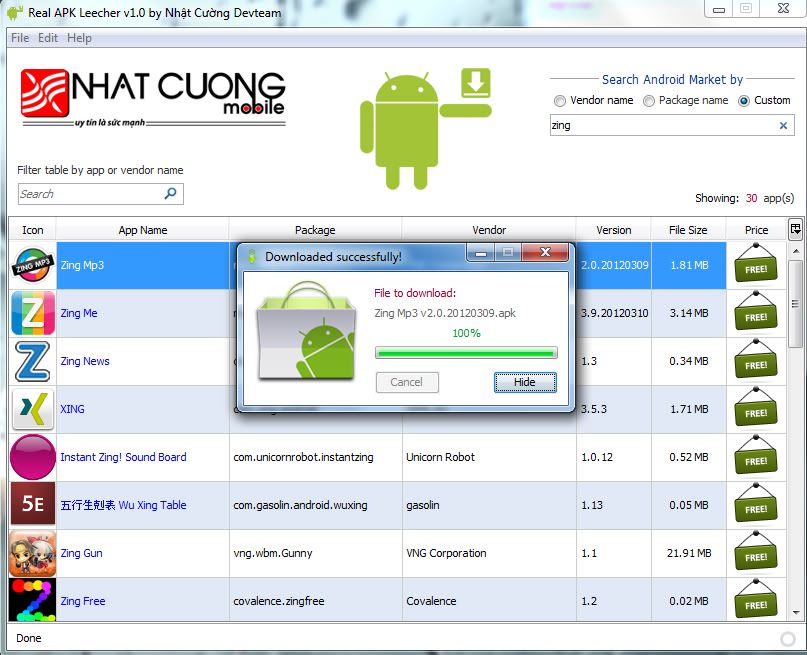
6-- Pronto now you can download games and applications directly to your computer.
Comment on what you thought of the tutorial, even more.